The Monek App
Your account, in your pocket
Check today's takings, search transactions, follow settlements and payouts, and send a Pay by Link request — from your iPhone or iPad. Sign in with Face ID, and no card details are ever entered in the app.
What you can do in the app
The Monek app is the companion to the Monek Portal — built for the things you need on the move, rather than a shrunken copy of the full desktop dashboard.
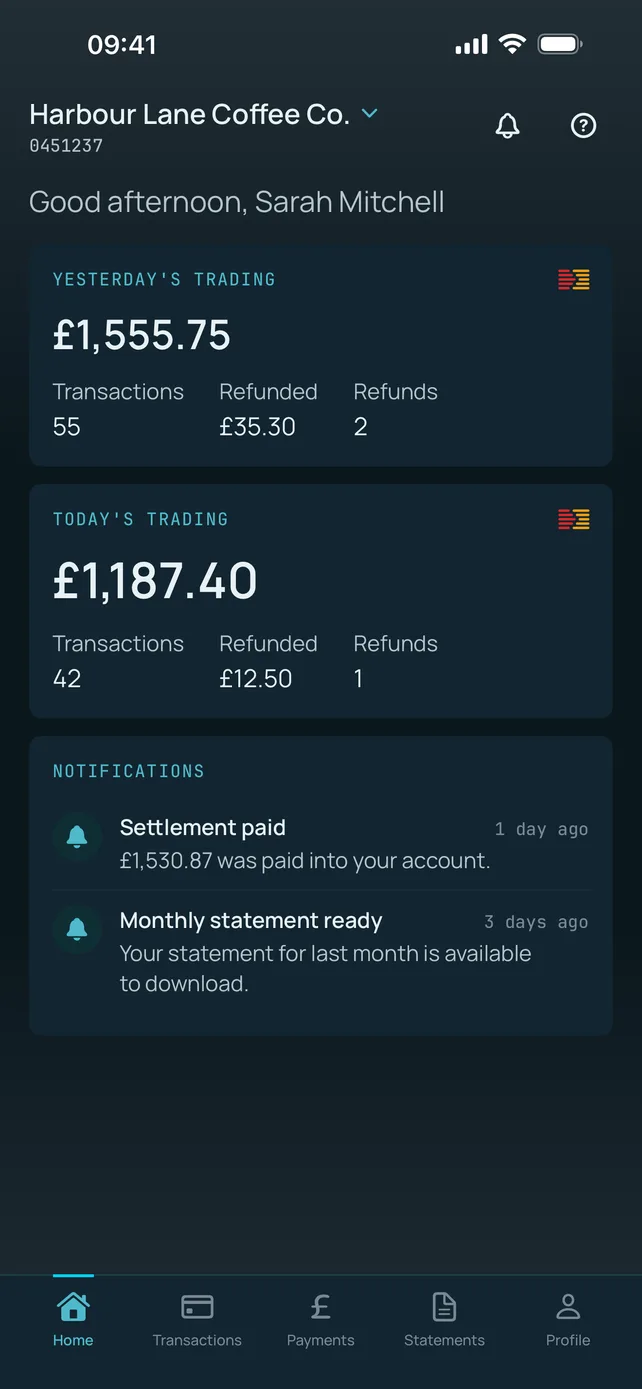
Yesterday and today, side by side
The home screen opens on both trading days at once — takings, transaction count, refunds and the amount refunded — so you know where you are against yesterday before you've put your coat down.
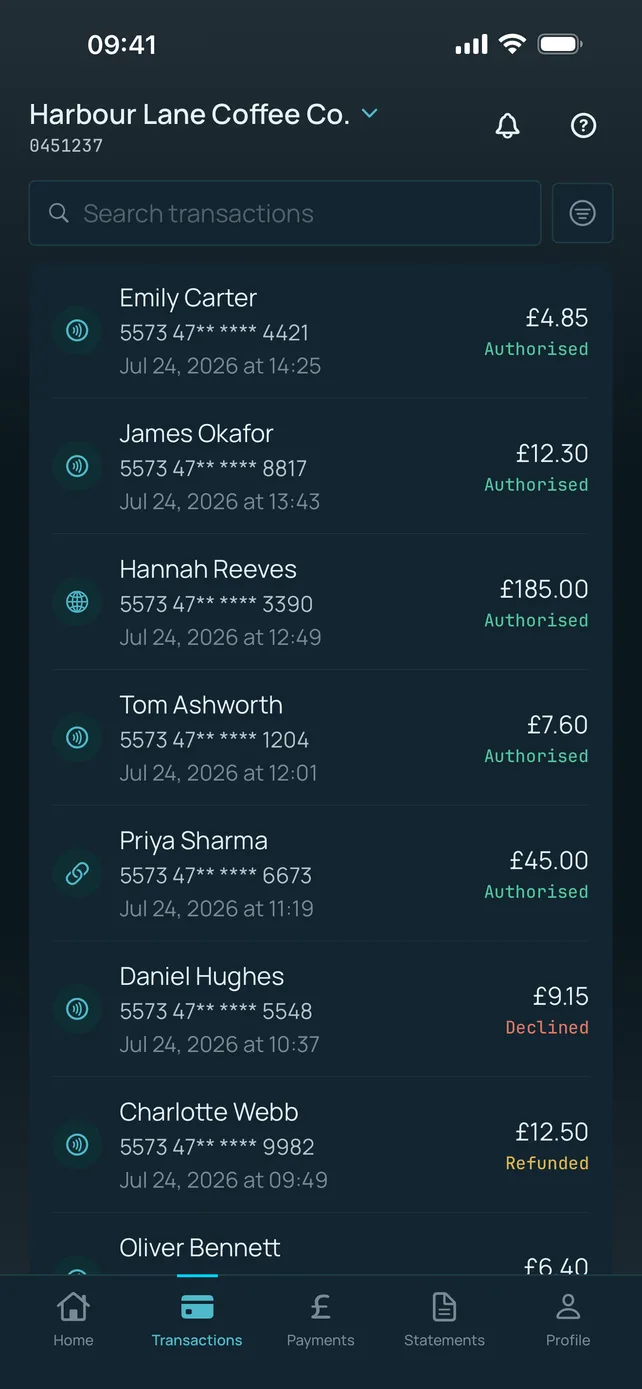
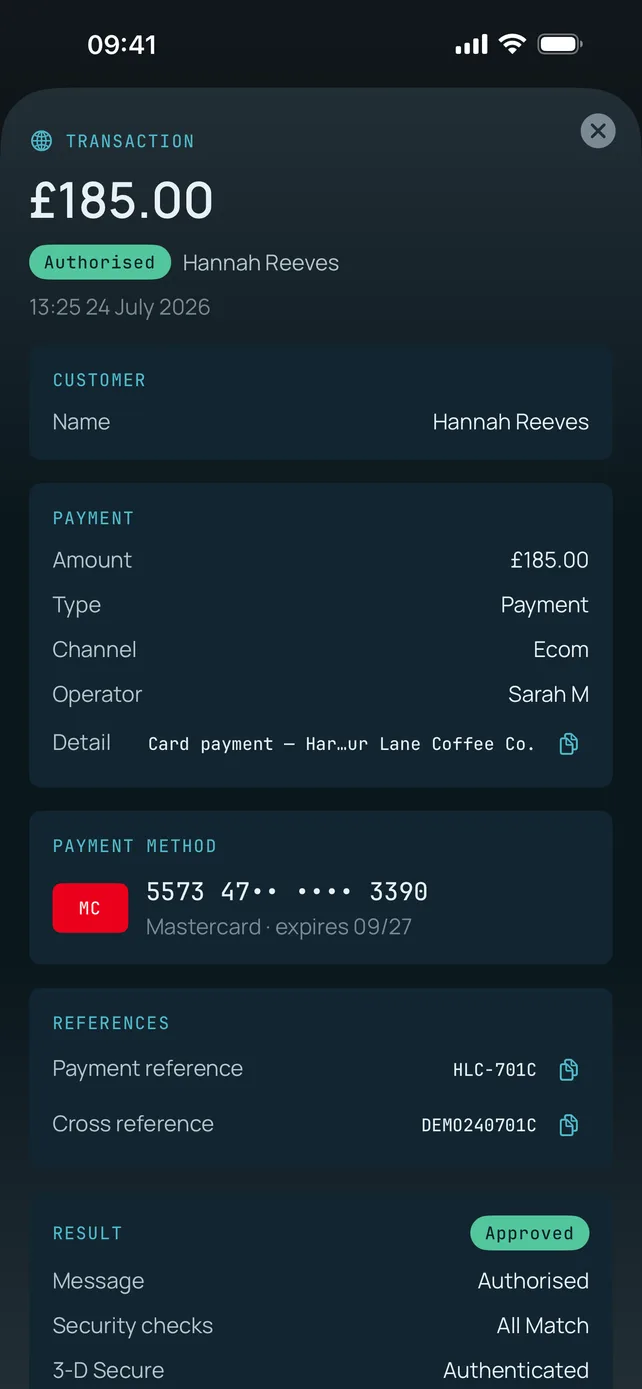
Search and drill into transactions
Search the full list, then open a transaction for the customer, channel, operator, payment method, both references, and the 3-D Secure and security-check results. Enough to answer a customer query on the spot.
Settlements and payouts
Track what has settled and what is on its way, including daily breakdowns, so you can reconcile against the bank without waiting to be back at a computer.
Statements as PDF or CSV
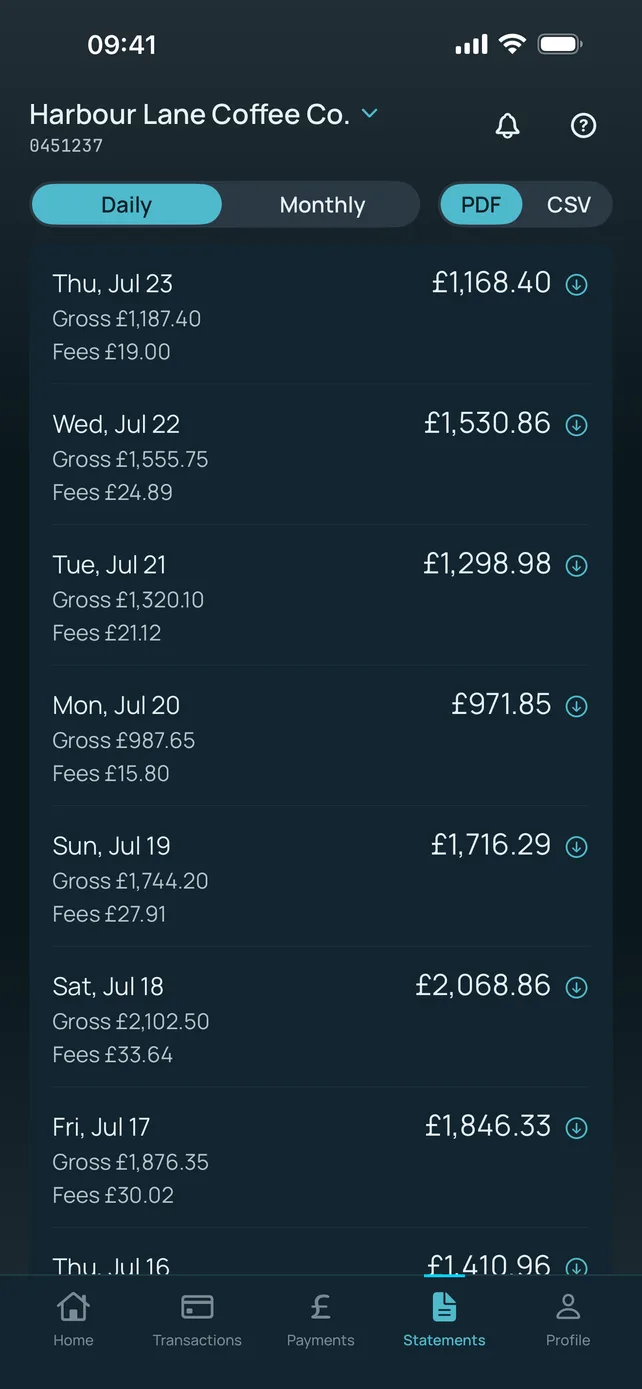
Switch between daily and monthly statements with gross takings and fees broken out, then download as a PDF for your records or a CSV for your accountant.
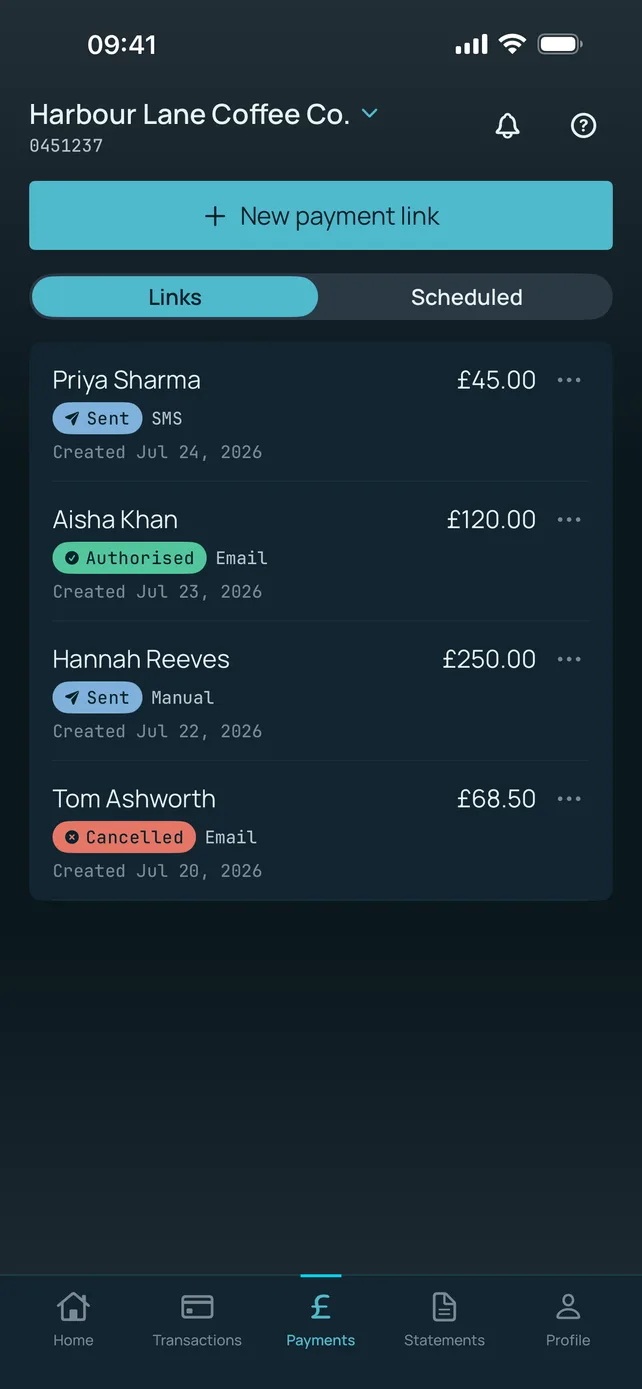
Create and manage Pay by Link
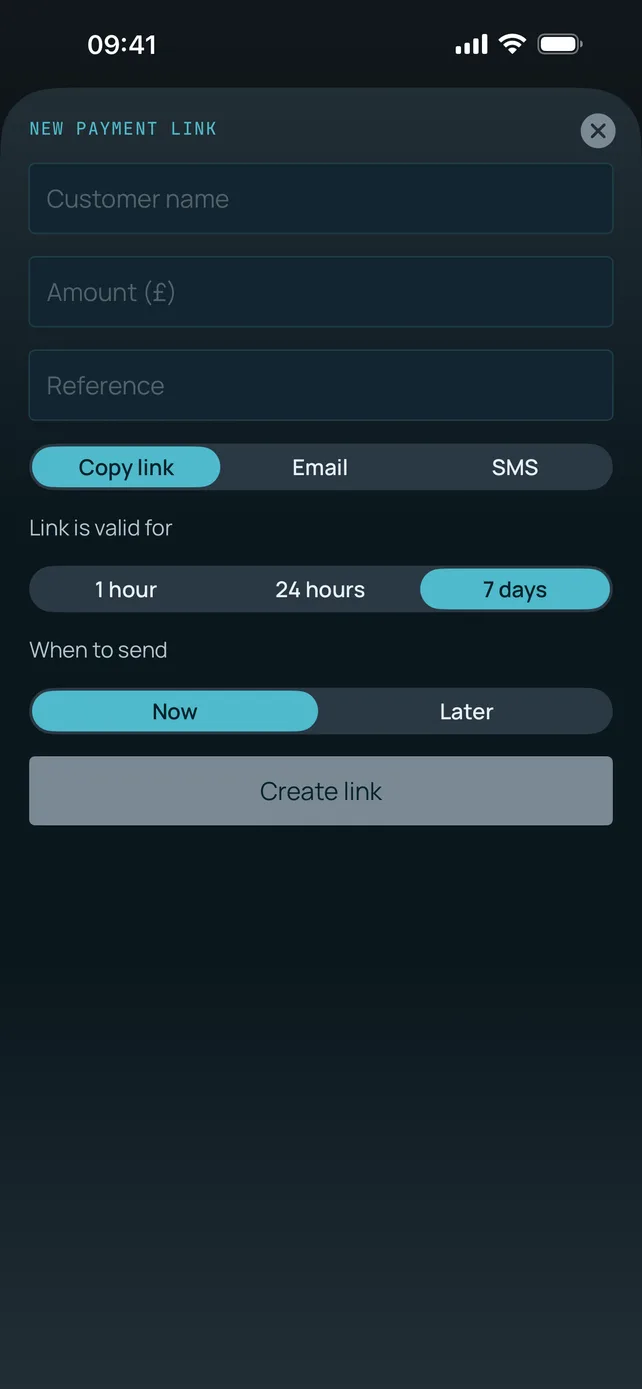
Set a customer name, amount and reference, choose whether to copy the link, email it or send it by SMS, and pick how long it stays valid — one hour, 24 hours or seven days. Track its status and cancel it if plans change, all without entering a card number.
Schedule links to go out later
Send now, or set a link to go out later and leave it in the Scheduled tab. Useful for deposit reminders and for billing that should land on a particular morning rather than at 9pm when you got round to it.
Push notifications
Get told about account activity as it happens rather than finding out the next morning. Particularly useful if you're waiting on a specific payment to land.
Switch between organisations
Manage more than one merchant organisation? Switch between them in the app without signing out and back in with a different set of credentials.
Profile and security settings
Manage your own profile and security preferences, including biometric sign-in and multi-factor authentication, directly from the app.
A look inside the app
Six screens, showing sample data. This is what you get on day one — there is nothing to configure first.
Built so a lost phone isn't a payments incident
A finance app on a device that lives in your pocket has to earn its place. Here is how the Monek app is put together.
Face ID, Touch ID and MFA
Sign in with biometrics on top of multi-factor authentication. Convenience on the front end, a second factor behind it — you are not trading one for the other.
Sessions stored in the Keychain
Your session is held in the device Keychain, protected by the hardware secure enclave, rather than in ordinary app storage that other processes could reach.
No card data in the app, ever
Card details are never entered, processed or stored in the Monek app. Pay by Link requests are created without a card number, and the customer pays on a hosted PCI DSS Level 1 checkout.
The same regulated rails
The app talks to the same FCA-authorised Monek platform (FRN 920628) as the Portal. Nothing about your account's regulatory or settlement position changes because you installed it.
Getting set up takes about a minute
Already a Monek merchant? Then there is nothing to sign up for and nothing to configure.
Download from the App Store
Free, 3.2 MB, no in-app purchases and no subscription. Search 'Monek' or tap the badge below.
Sign in with your Monek details
Use the same credentials and multi-factor authentication you already use for the Monek Portal. There is no separate app account to create.
Turn on Face ID and notifications
Enable biometric sign-in so you're two seconds from your dashboard, and switch on push notifications for account activity.
Android version in development. In the meantime, portal.monek.com works in any mobile browser.
Requirements and availability
Published by Monek Limited on the App Store. Support: [email protected] or 0345 269 6645.
Frequently asked questions
Does the Monek app cost anything?+
Do I need a separate account or login for the app?+
Can I take card payments through the app?+
How long does a payment link stay valid, and can I send it later?+
Can I get statements out of the app for my accountant?+
Is there an Android version?+
What devices does the app run on?+
How secure is it if I lose my phone?+
Can I manage more than one merchant organisation?+
Does the app replace the Monek Portal?+
Where the app fits in
Pay by Link
The payment requests you create in the app, explained in full — channels, tracking and fees.
Explore →Online Payments
Virtual Terminal, hosted checkout and ecommerce, all reporting into the same account.
Explore →Card Machines
Face-to-face payments on PAX terminals — the transactions you'll see land in the app.
Explore →Get the Monek app
Free for every Monek merchant. Not with Monek yet? Send us a recent statement and we'll quote you a like-for-like UK rate within an hour.